

Hey there! As a supplier of Vehicle PTZ Cameras, I've seen firsthand the importance of mounting these cameras securely. A wobbly or poorly installed camera can lead to blurry footage, inaccurate tracking, and even damage to the camera itself. In this blog post, I'll share some tips on how to mount a Vehicle PTZ Camera securely, so you can get the most out of your surveillance system.
Choose the Right Mounting Location
The first step in mounting a Vehicle PTZ Camera securely is to choose the right location. You'll want to find a spot that provides a clear view of the area you want to monitor, while also being protected from the elements and potential damage. Some common mounting locations for Vehicle PTZ Cameras include:
- Roof Mount: This is a popular option for vehicles, as it provides a high vantage point and a wide field of view. However, it's important to make sure the roof is strong enough to support the weight of the camera and mount, and that the mount is properly secured to prevent it from vibrating or coming loose while the vehicle is in motion.
- Bumper Mount: Another option is to mount the camera on the front or rear bumper of the vehicle. This can provide a good view of the road ahead or behind, but it's important to make sure the mount is designed to withstand the impact of a collision.
- Side Mount: You can also mount the camera on the side of the vehicle, which can be useful for monitoring blind spots or areas that are difficult to see from the front or rear. However, it's important to make sure the mount is positioned in a way that doesn't obstruct the driver's view.
Select the Right Mounting Hardware
Once you've chosen the right mounting location, the next step is to select the right mounting hardware. There are several types of mounts available, each designed for a specific type of camera and mounting location. Some common types of mounts include:
- Universal Mount: This type of mount is designed to fit a wide range of cameras and can be used in a variety of mounting locations. It typically consists of a base plate and a bracket that can be adjusted to fit the camera.
- Fixed Mount: A fixed mount is designed to hold the camera in a specific position and is typically used for cameras that don't need to be adjusted frequently. It's a simple and cost-effective option, but it may not be suitable for all applications.
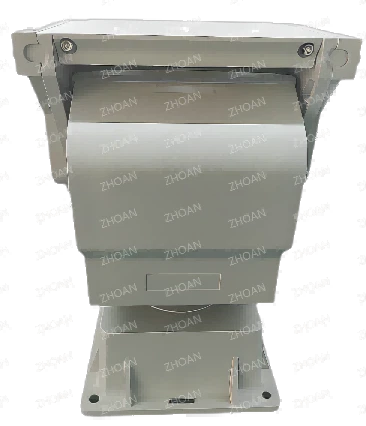
- Pan-Tilt Mount: A pan-tilt mount allows the camera to be adjusted horizontally and vertically, providing a wider field of view and the ability to track moving objects. This type of mount is typically used for surveillance applications where the camera needs to be able to follow a subject.
When selecting the right mounting hardware, it's important to consider the weight and size of the camera, as well as the mounting location and the type of vehicle. You'll also want to make sure the mount is made from high-quality materials that are durable and weather-resistant.
Install the Mounting Hardware
Once you've selected the right mounting hardware, the next step is to install it. The installation process will vary depending on the type of mount and the mounting location, but here are some general tips to keep in mind:

- Read the Instructions: Before you start installing the mount, make sure you read the instructions carefully. This will help you understand the installation process and ensure that you have all the necessary tools and materials.
- Prepare the Mounting Surface: The mounting surface should be clean, dry, and free of any debris or grease. If necessary, use a degreaser or sandpaper to prepare the surface.
- Mark the Mounting Holes: Use a pencil or marker to mark the location of the mounting holes on the vehicle. Make sure the marks are accurate and aligned with the holes on the mount.
- Drill the Mounting Holes: Use a drill to drill the mounting holes in the vehicle. Make sure the holes are the correct size and depth for the mounting hardware.
- Install the Mounting Hardware: Once the holes are drilled, install the mounting hardware using the appropriate screws or bolts. Make sure the hardware is tightened securely, but not so tight that it damages the vehicle or the mount.
Mount the Camera
Once the mounting hardware is installed, the next step is to mount the camera. The process will vary depending on the type of camera and mount, but here are some general tips to keep in mind:
- Align the Camera: Make sure the camera is aligned with the mounting bracket and that the lens is pointing in the desired direction.
- Secure the Camera: Use the appropriate screws or bolts to secure the camera to the mounting bracket. Make sure the camera is tightened securely, but not so tight that it damages the camera or the mount.
- Connect the Wires: Once the camera is mounted, connect the wires to the power supply and the video recorder. Make sure the connections are secure and that the wires are properly routed to prevent them from getting damaged.
Test the Camera
Once the camera is mounted and the wires are connected, the final step is to test the camera to make sure it's working properly. Here are some things to check:
- Power Supply: Make sure the camera is receiving power and that the power supply is working properly.
- Video Feed: Check the video feed on the recorder to make sure the camera is capturing clear and stable footage.
- Pan-Tilt Function: If the camera has a pan-tilt function, test it to make sure it's working properly. Use the controls on the recorder to move the camera horizontally and vertically and make sure it's responding correctly.
Conclusion
Mounting a Vehicle PTZ Camera securely is an important step in ensuring the effectiveness of your surveillance system. By choosing the right mounting location, selecting the right mounting hardware, installing the mount correctly, mounting the camera securely, and testing the camera, you can ensure that your camera is providing clear and stable footage of the area you want to monitor.
If you're in the market for a Vehicle PTZ Camera or need help with installation, please don't hesitate to contact us. We're a leading supplier of Vehicle PTZ Cameras and can provide you with the products and services you need to get the most out of your surveillance system.
References
- "How to Mount a Security Camera," Security Camera King, accessed [date].
- "Vehicle Mounting Options for PTZ Cameras," CCTV Camera World, accessed [date].
- "Choosing the Right Mounting Hardware for Your Camera," B&H Photo Video, accessed [date].


