

Is it possible to control a Landscape PTZ Camera with a mobile app? You bet it is! As a supplier of Landscape PTZ Cameras, I've seen firsthand how technology has revolutionized the way we interact with these devices. In this blog post, I'll dive into the details of mobile app control for Landscape PTZ Cameras, sharing my insights and experiences.

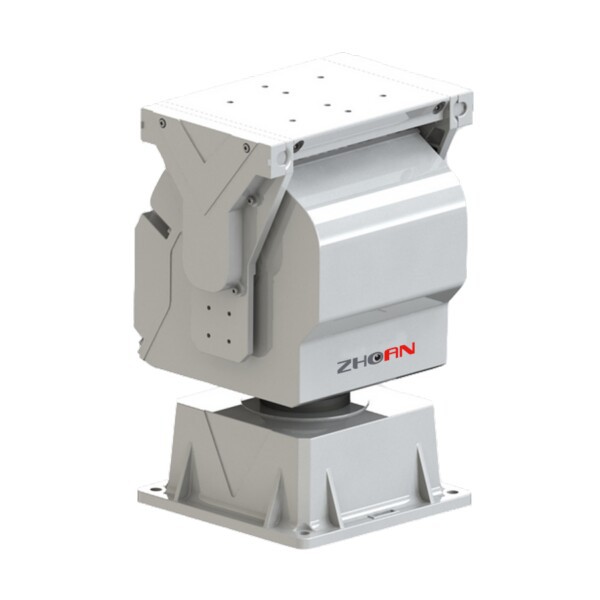
Let's start by understanding what a Landscape PTZ Camera is. PTZ stands for Pan, Tilt, and Zoom. These cameras can move horizontally (pan), vertically (tilt), and adjust the zoom level, giving you a wide range of viewing angles and the ability to focus on specific areas. Landscape PTZ Cameras are designed for outdoor use, often in large areas like parks, gardens, and commercial landscapes. They need to be durable, weather-resistant, and have high-quality imaging capabilities.
Now, the big question: Can you control these cameras with a mobile app? The short answer is yes. Most modern Landscape PTZ Cameras come with mobile app support. This means you can control the camera's movement, zoom, and other settings right from your smartphone or tablet. It's incredibly convenient, especially if you're on the go or away from the camera's physical location.
One of the main advantages of using a mobile app to control a Landscape PTZ Camera is the flexibility it offers. You can access the camera's feed and control it from anywhere with an internet connection. For example, if you're at work and want to check on your garden or a construction site, you can simply open the app and see what's happening in real-time. You can pan the camera to different areas, tilt it up or down, and zoom in on specific details.
Another benefit is the ease of use. Mobile apps are designed to be user-friendly, with intuitive interfaces that make it easy for anyone to operate the camera. Even if you're not tech-savvy, you can quickly learn how to use the app to control the camera. You can also save presets, which are pre-defined positions for the camera. This means you can quickly jump to a specific view without having to manually adjust the camera every time.
But how does it work? Well, most cameras connect to your home or business network via Wi-Fi or Ethernet. Once connected, you can download the camera's corresponding mobile app from the App Store or Google Play. After installing the app, you'll need to pair it with the camera. This usually involves entering the camera's IP address or scanning a QR code. Once paired, you're ready to start controlling the camera.
When it comes to the features available in mobile apps, the options are often extensive. Some apps allow you to adjust the camera's image settings, such as brightness, contrast, and color saturation. You can also enable features like motion detection, which will send you an alert if the camera detects movement in its field of view. This is great for security purposes, as you can be notified immediately if there's any suspicious activity.
In addition to basic control and security features, some mobile apps also offer advanced functionality. For example, you might be able to set up scheduled recordings, so the camera records at specific times. You can also access the camera's playback feature, which allows you to review past footage. This can be useful for monitoring activities over a period of time or for investigating incidents.
Now, let's talk about the types of Landscape PTZ Cameras that are compatible with mobile apps. There are several options available on the market, each with its own features and capabilities. For example, the Network High Speed PTZ Camera With IR is a great choice for those who need a high-quality camera with fast movement and infrared capabilities for night vision. It's designed for outdoor use and can withstand harsh weather conditions.
Another option is the Outdoor Heavy Duty Intelligent Variable Speed Pan Tilt. This camera is built to be rugged and durable, making it suitable for large outdoor areas. It offers variable speed control, which means you can adjust the camera's movement speed according to your needs.
If you're looking for a more discreet option, the Intelligent Hidden Security Camera in Landscape Network PTZ Camera with OEM Service for Safe City might be the right choice. This camera is designed to blend in with the landscape, making it less noticeable. It also offers OEM service, which means you can customize the camera according to your specific requirements.
Of course, like any technology, there are some potential challenges when it comes to using a mobile app to control a Landscape PTZ Camera. One of the main issues is the internet connection. If your internet is slow or unstable, it can affect the camera's performance and the quality of the video feed. You might experience lag or buffering, which can be frustrating. To avoid this, make sure you have a reliable internet connection and that your camera is connected to a strong Wi-Fi signal or a stable Ethernet network.
Another challenge is the security of the mobile app and the camera. Since you're accessing the camera's feed and control settings remotely, it's important to ensure that your connection is secure. Make sure you use a strong password for the app and enable any security features offered by the camera, such as encryption. This will help protect your privacy and prevent unauthorized access to the camera.
In conclusion, controlling a Landscape PTZ Camera with a mobile app is not only possible but also highly beneficial. It offers flexibility, convenience, and a wide range of features that make it easier to monitor and manage your outdoor spaces. Whether you're a homeowner looking to keep an eye on your garden or a business owner monitoring a construction site, a mobile app-controlled Landscape PTZ Camera can be a valuable tool.
If you're interested in purchasing a Landscape PTZ Camera with mobile app support, I encourage you to reach out to us. We're a leading supplier of high-quality Landscape PTZ Cameras, and we can help you find the right camera for your needs. Contact us today to start a conversation about your requirements and explore the options available.
References
- General knowledge about Landscape PTZ Cameras and mobile app technology.
- Product specifications and features of the cameras mentioned in the blog post.


