

Hey there! As a supplier of Hidden PTZ cameras, I often get asked this question: "Can a Hidden PTZ camera be controlled manually?" Well, let's dive right into it and break this down.
First off, for those who might not know, a PTZ camera stands for Pan - Tilt - Zoom camera. "Pan" means moving the camera horizontally, "tilt" is the vertical movement, and "zoom" is all about getting closer or farther from the subject. Hidden PTZ cameras are, as the name suggests, PTZ cameras that are designed to be discreetly placed, often for surveillance purposes where you don't want the camera to be easily spotted.
Now, to answer the big question - yes, a Hidden PTZ camera can absolutely be controlled manually. There are several ways to do this, and I'll go through them one by one.
Manual Control Methods
1. Physical Control Panel
Some Hidden PTZ cameras come with a physical control panel. This is like a small box with buttons that you can use to pan, tilt, and zoom the camera. It's a straightforward way to take direct control. You just press the buttons in the direction you want the camera to move or adjust the zoom level. It's super handy when you're right there on - site and need to quickly change the camera's view. For example, if you're in a security control room and you spot something suspicious on the monitor, you can use the control panel to immediately focus the camera on that area.

2. Remote Control
Just like your TV remote, many Hidden PTZ cameras come with a dedicated remote control. This gives you the freedom to control the camera from a distance. You can sit on a couch across the room or even be outside the building and still have full control over the camera's movements. It's great for situations where you don't want to be near the control panel or if you need to make adjustments while on the move.
3. Software on a Computer or Mobile Device
Most modern Hidden PTZ cameras can be connected to a computer or a mobile device via Wi - Fi or Ethernet. There are usually specific software applications that you can download. Once installed, you can use your computer mouse or touchscreen to control the camera. This method is really flexible because you can control the camera from anywhere as long as you have an internet connection. You could be on vacation and still keep an eye on your property by using your smartphone to adjust the camera's view.
Advantages of Manual Control
1. Immediate Response
When you manually control a Hidden PTZ camera, you can respond instantly to any situation. Say you see someone acting suspiciously on the camera feed. You can quickly pan the camera to follow their movements, tilt it to get a better angle, or zoom in to see their face clearly. This real - time control can be crucial in security - sensitive environments.
2. Flexibility
Manual control allows you to explore different angles and views according to your specific needs. You're not restricted by pre - set programs or automated movements. For example, if you're using the camera for event monitoring, you can focus on specific speakers, guests, or activities as they happen.
3. Learning and Familiarization
By manually controlling the camera, you get to know its capabilities better. You can experiment with different pan, tilt, and zoom settings to understand how the camera behaves in various lighting conditions and distances. This knowledge can be really useful in the long run for optimizing the camera's performance.
Our Hidden PTZ Camera Offerings
As a Hidden PTZ camera supplier, we have a range of high - quality products to meet different needs. One of our popular products is the HD Intelligent PTZ Camera. It has excellent image quality and can be easily controlled manually using the software on your computer or mobile device. The camera also has a built - in night vision feature, making it suitable for 24/7 surveillance.
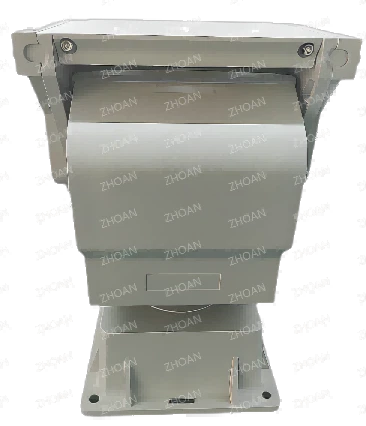
Another great option is the ZA - PT540 Medium Duty Motorized Pan Tilt Positioner. It's designed for medium - duty applications and can support various types of cameras. You can control the pan and tilt movements smoothly using the provided remote control or physical control panel.
And if you need a more heavy - duty solution, our Variable Speed Medium Duty Motorized Pan Tilt Head With15kg (33.07lb) Payload is a great choice. It can handle larger cameras and equipment, and offers variable - speed control for precise movements.
Considerations When Manually Controlling Hidden PTZ Cameras
1. Power Supply
Make sure your Hidden PTZ camera has a stable power supply. If the power goes out during manual control, it can disrupt your operation and might even cause the camera to lose its position. You might want to consider using a backup power source, especially in areas where power outages are common.
2. Signal Interference
When using wireless control methods like a remote control or Wi - Fi connectivity, there could be signal interference. Things like other electronic devices, thick walls, or large metal objects can weaken the signal. If you experience issues with control, try moving the camera or the control device to a different location to improve the signal strength.
3. Training
Although manual control of Hidden PTZ cameras is generally easy, it's still a good idea to provide some training to the people who will be using the control systems. This ensures that they know how to operate the camera safely and effectively, and can get the most out of its features.
Conclusion
So, to sum it all up, a Hidden PTZ camera can definitely be controlled manually, and there are multiple ways to do it. Manual control offers immediate response, flexibility, and an opportunity to learn about the camera's capabilities. At our company, we have a wide range of Hidden PTZ cameras and related products that are easy to control manually.
If you're interested in our Hidden PTZ cameras or have any questions about manual control or other features, feel free to reach out to us. We're always here to help you find the best solution for your surveillance needs. Whether you're a business owner looking to secure your premises or a homeowner wanting to keep an eye on your property, we've got you covered. Let's start a conversation and see how we can work together to meet your requirements.
References
- Manufacturer's manuals for HD Intelligent PTZ Camera, ZA - PT540 Medium Duty Motorized Pan Tilt Positioner, and Variable Speed Medium Duty Motorized Pan Tilt Head With15kg (33.07lb) Payload.
- Industry reports on PTZ camera technology and usage trends.


